A good broadband speed helps you browse the web, stream videos, make video calls, play online games and connect several devices without constant buffering or slow loading.
But what counts as a good broadband speed depends on how you use the internet and how many people use your connection at the same time.
For example, one person who mainly checks emails may not need hundreds of Mbps. A busy family with several phones, smart TVs, laptops, gaming consoles and other devices may need a much faster connection.
In the UK, broadband is commonly described as standard, superfast or ultrafast. Ofcom currently defines standard broadband as up to 30 Mbit/s, superfast as 30 to 300 Mbit/s, and ultrafast as 300 Mbit/s or more.
This guide explains what a good broadband speed means, how much speed different activities need, how to test your broadband, and what to consider when choosing a UK broadband package.
What Is a Good Broadband Speed?
For many UK homes, a broadband connection of 30 Mbps or more can provide a useful everyday connection.
However, there is no single speed that is perfect for everyone.
A simple guide is:
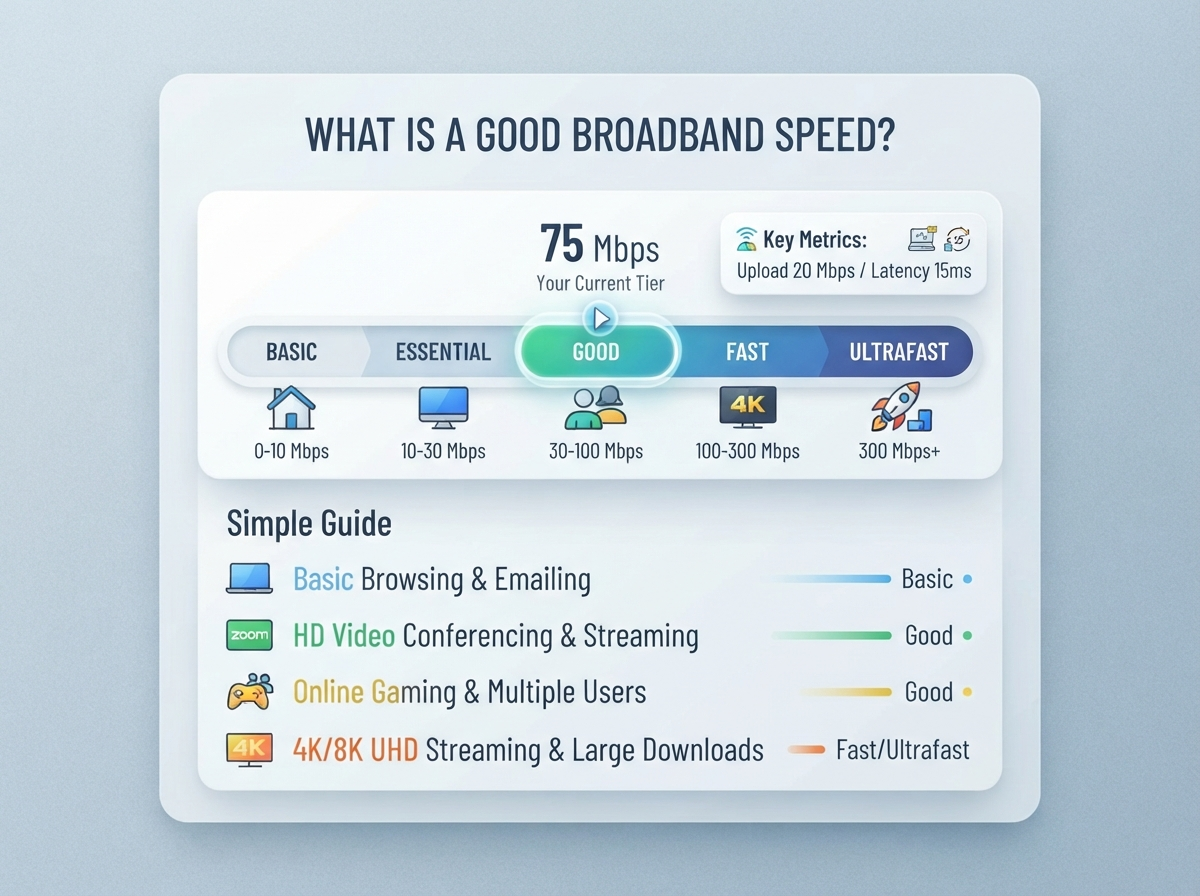
| Broadband speed | Best for |
|---|---|
| Under 10 Mbps | Very basic browsing and email |
| 10–30 Mbps | Browsing, email and light streaming |
| 30–100 Mbps | Everyday use, HD streaming and video calls |
| 100–300 Mbps | Families, streaming, gaming and multiple devices |
| 300–500 Mbps | Busy homes and heavy internet use |
| 500 Mbps–1 Gbps | Many devices, 4K streaming, large downloads |
| 1 Gbps+ | Very heavy use and large households |
Ofcom describes superfast broadband as 30 to 300 Mbit/s and says this range suits many everyday activities such as working from home, video calls and streaming. Ultrafast broadband is 300 Mbit/s or more and can be useful when several people are online or when a household regularly streams, games or downloads large files.
What Broadband Speed Do Most Homes Need?
Most homes do not need the fastest package available.
The right speed depends on:
- Number of people in your home
- Number of connected devices
- Streaming habits
- Online gaming
- Video calls
- Working from home
- Large file downloads
- Uploading photos and videos
- Smart home devices
For example, a person living alone may be comfortable with 30–100 Mbps, while a family with several people streaming and gaming at the same time may prefer 100–300 Mbps or more.
The important thing is to choose a speed that matches your real usage.
Broadband Speed Guide for Different Households
Here is a simple starting point.
| Household | Suggested speed |
|---|---|
| 1 person, light use | 30–50 Mbps |
| 1–2 people, normal use | 50–100 Mbps |
| 2–4 people | 100–300 Mbps |
| 4+ people | 300 Mbps+ |
| Heavy streaming and gaming | 300 Mbps+ |
| Large household with many devices | 500 Mbps–1 Gbps+ |
These are practical guide ranges, not strict requirements. Your actual needs can be lower or higher depending on what everyone does online.
Is 30 Mbps a Good Broadband Speed?
Yes, 30 Mbps can be a good broadband speed for basic and normal internet use, especially for a small household.
It can be suitable for:
- Web browsing
- Social media
- Music streaming
- Video calls
- Standard and some HD video streaming
- Online shopping
- General everyday use
Ofcom classifies 30 Mbit/s and above as superfast broadband.
However, 30 Mbps can feel limited if several people are using the connection heavily at the same time.
For example, if one person is watching high-quality video while another is gaming and someone else is downloading a large file, a faster connection may provide a better experience.
Is 50 Mbps a Good Broadband Speed?
50 Mbps is a good speed for many small households.
It can handle normal browsing, streaming, video calls and several connected devices.
A 50 Mbps connection may be enough for:
- One or two people
- HD streaming
- Video meetings
- Social media
- Online shopping
- Music streaming
- Normal gaming
- Multiple smartphones and laptops
The experience can also depend on your Wi-Fi network and router.
Is 100 Mbps a Good Broadband Speed?
100 Mbps is a strong everyday broadband speed for many homes.
It gives you more room for several devices and activities at the same time.
With 100 Mbps, you can comfortably use broadband for:
- HD streaming
- 4K streaming
- Video calls
- Online gaming
- Work from home
- Large downloads
- Multiple smartphones
- Smart TVs
- Tablets and laptops
For a small or medium-sized family, 100 Mbps can be a practical target.
Is 200 Mbps a Good Broadband Speed?
Yes. 200 Mbps is more than enough for many busy homes.
It provides extra capacity when several people are online.
For example:
- One person can watch a video.
- Another can join a video call.
- Someone else can play an online game.
- Another person can browse the web.
- Several devices can remain connected.
The connection may still slow down if there are Wi-Fi problems, network congestion or other technical issues.
Is 300 Mbps a Good Broadband Speed?
300 Mbps is a very fast broadband connection for most everyday households.
Ofcom places 300 Mbit/s and above in the ultrafast category.
It can be useful for:
- Large families
- Several simultaneous streams
- 4K video
- Online gaming
- Working from home
- Large downloads
- Uploading large files
- Many connected devices
For many households, 300 Mbps provides plenty of capacity.
Is 500 Mbps a Good Broadband Speed?
500 Mbps is a high-speed connection and can be useful for homes with heavy internet use.
It can make large downloads and uploads much faster and gives multiple users plenty of bandwidth.
It may be useful when your home has:
- Several 4K streaming devices
- Multiple gamers
- Many laptops and smartphones
- Smart home devices
- Large file transfers
- Frequent cloud backups
- People working from home
However, paying for 500 Mbps does not automatically mean every device will receive 500 Mbps over Wi-Fi.
Is 1 Gbps Broadband Worth It?
1 Gbps means 1,000 Mbps.
Gigabit broadband can provide very fast download speeds and is useful for households with heavy internet use.
Ofcom describes gigabit-capable broadband as connections capable of 1 Gbit/s and above. Its 2025 UK report says gigabit-capable broadband was available to 89% of UK homes at that point in its January 2026 snapshot.
A 1 Gbps package may be useful for:
- Large households
- Frequent large downloads
- Multiple 4K streams
- Serious online gaming
- Large cloud backups
- Multiple people working from home
- Many connected devices
For a person who mainly browses websites and watches occasional videos, however, 1 Gbps may provide much more capacity than they actually use.
What Is a Good Download Speed?
Download speed is the speed at which information comes from the internet to your device.
It affects activities such as:
- Watching videos
- Downloading files
- Loading websites
- Downloading games
- Installing apps
- Streaming music
The higher the download speed, the more quickly large amounts of data can normally be transferred.
For many homes, 100 Mbps or more provides a comfortable everyday experience.
What Is a Good Upload Speed?
Upload speed is the speed at which information moves from your device to the internet.
It matters when you:
- Upload photos
- Upload videos
- Back up files
- Send large attachments
- Join video meetings
- Stream your own content
- Use cloud storage
Download speed often gets more attention, but upload speed can be important for people who work from home or regularly upload large files.
What Is a Good Speed for Streaming?
Streaming requirements depend on video quality and the service being used.
As a general guide:
| Activity | Approximate speed to aim for |
|---|---|
| Basic browsing | 1–5 Mbps |
| Standard video | Around 5 Mbps |
| HD streaming | Around 5–10 Mbps |
| 4K/UHD streaming | Around 25–30 Mbps per stream |
| Multiple 4K streams | 100 Mbps+ can be useful |
Ofcom’s guidance gives around 30 Mbit/s as a useful reference for one person streaming Ultra HD video and around 300 Mbit/s for multiple people streaming UHD video.
Remember that several people streaming at the same time can increase the total bandwidth needed.
What Is a Good Broadband Speed for Gaming?
Online gaming does not always require extremely high download speeds.
For gaming, other factors are also important.
These include:
- Ping
- Jitter
- Packet loss
- Connection stability
- Wi-Fi quality
- Server distance
A fast connection with high ping can still feel frustrating during online games.
For gaming, a stable connection with low latency can be more important than simply having the biggest Mbps number.
What Is a Good Broadband Speed for Working From Home?
For working from home, your needs depend on your job.
Simple office work may not require a very fast connection.
However, video meetings, cloud applications and large file transfers can require more capacity.
| Work activity | Suitable starting point |
|---|---|
| Emails and web browsing | 10–30 Mbps |
| Video calls | 30 Mbps+ |
| Cloud applications | 30–50 Mbps+ |
| Multiple people working | 100 Mbps+ |
| Large file uploads | Faster upload speed is useful |
A reliable connection is often just as important as raw speed.
Why Does My Broadband Feel Slow Even With a Fast Package?
Your broadband package speed is not the only thing that affects your internet experience.
A fast package can still feel slow because of:
Wi-Fi distance
Your device may receive a weaker Wi-Fi signal when it is far away from the router.
Walls and floors
Thick walls, floors and other obstacles can reduce Wi-Fi performance.
Router problems
An old or poorly placed router can affect your connection.
Network congestion
Internet use can increase during busy periods.
Device limitations
An older phone, laptop or Wi-Fi adapter may not be able to use the full speed available.
Background downloads
Other devices may be downloading updates, games or large files.
Website or server problems
Sometimes the problem is not your broadband connection. The website or service you are accessing may be slow.
How to Check Your Broadband Speed
The easiest way to see your current connection performance is to run a broadband speed test.
You can use our Broadband Speed Test to check your connection.
A speed test can show important information such as:
- Download speed
- Upload speed
- Ping or latency
- Connection performance
For a more reliable result, close unnecessary downloads and streaming services before testing.
If possible, test your connection using an Ethernet cable because Wi-Fi can reduce the measured speed. Ofcom also recommends using an Ethernet connection when you want the most accurate possible speed test.
How to Test if Your Broadband Is Good Enough
Follow these simple steps:
- Stop large downloads.
- Close unnecessary apps.
- Connect your computer to the router.
- Use an Ethernet cable if possible.
- Run a broadband speed test.
- Record your download speed.
- Record your upload speed.
- Check your ping.
- Repeat the test at different times.
- Compare the results with the speed promised by your provider.
Testing at different times can help you understand whether your connection is consistently performing well.
Your Advertised Speed Is Not Always Your Actual Speed
When you buy broadband, the advertised speed is not necessarily the exact speed every device will receive all the time.
Your actual performance can be affected by:
- Your connection type
- Your home network
- Wi-Fi
- Router performance
- Network traffic
- Device capability
- Distance and physical obstacles
Ofcom says providers should give customers information about expected speeds, including a minimum guaranteed speed for applicable broadband products.
This is why testing your actual connection can be useful.
Standard vs Superfast vs Ultrafast Broadband
The UK broadband market uses different speed categories.
| Type | Speed | Suitable for |
|---|---|---|
| Standard | Up to 30 Mbps | Basic browsing and email |
| Superfast | 30–300 Mbps | Streaming, video calls and everyday use |
| Ultrafast | 300 Mbps+ | Busy homes and heavy internet use |
| Gigabit-capable | 1 Gbps+ | Very high-speed connections |
Ofcom uses these categories to describe broadband speeds available to UK households.
How to Choose a Good Broadband Package
Do not choose a broadband package only because it has the biggest number.
Think about your actual needs.
1. Count the people
More people using the internet at the same time usually means you need more capacity.
2. Count your devices
Phones, TVs, laptops, tablets, consoles and smart devices can all use your connection.
3. Think about streaming
If your household watches several HD or 4K streams, consider a faster package.
4. Consider gaming
For gaming, look beyond download speed and consider ping and connection stability.
5. Check upload speed
If you work from home, upload large files or use cloud backups, upload speed can matter.
6. Check availability
Not every broadband technology or speed is available at every UK address.
Ofcom provides a broadband checker that can show broadband services and predicted speeds available at a location.
Compare UK Broadband Providers
Once you know the speed you need, the next step is to look at the providers available at your address.
Different providers can offer different:
- Download speeds
- Upload speeds
- Contract terms
- Prices
- Network types
- Router options
- Customer service
- Availability
You can use our UK Broadband Providers guide to learn more about broadband providers and the types of connections available in the UK.
It is also useful to check what is actually available at your home rather than choosing a provider based only on national coverage.
What Is a Good Broadband Speed for a Family?
For a family, 100–300 Mbps can be a useful range to consider, depending on the number of people and how heavily they use the internet.
For example:
| Family use | Suggested range |
|---|---|
| Light family use | 50–100 Mbps |
| Normal family use | 100–200 Mbps |
| Heavy streaming and gaming | 200–500 Mbps |
| Very busy home | 500 Mbps–1 Gbps+ |
These are practical guidelines rather than fixed rules.
A family with four people may need less speed than a three-person household where everyone regularly streams 4K video, games online and uploads large files.
What Is a Good Broadband Speed in Rural UK Areas?
Broadband availability can vary between locations.
Some rural homes may have fewer fixed-line options than homes in cities and towns.
Ofcom’s 2026 infrastructure update reported that full-fibre broadband was available to 82% of UK residential premises as of January 2026, while gigabit-capable broadband was available to 89%.
Availability can differ significantly by individual property, so checking your address is important.
What If Your Broadband Speed Is Too Slow?
If your speed is lower than expected, try these steps:
- Restart your router.
- Move closer to the router.
- Test using Ethernet.
- Stop downloads on other devices.
- Check your router settings.
- Test at different times.
- Check your provider for outages.
- Compare your result with your package’s expected speed.
- Contact your provider if the problem continues.
If you regularly get much lower speeds than expected, your broadband provider may be able to investigate the connection.
Important Points to Remember
- A good broadband speed depends on your household.
- 30 Mbps is the starting point for Ofcom’s superfast category.
- 100 Mbps is suitable for many small and medium-sized households.
- 300 Mbps+ can be useful for busy homes.
- 1 Gbps is designed for very high-speed use.
- Download speed is not the only important factor.
- Upload speed matters for video calls and large file uploads.
- Ping matters for online gaming.
- Wi-Fi can make a fast broadband connection appear slower.
- Test your broadband before deciding that your provider is the problem.
- Check broadband availability at your exact address.
- Compare the package’s expected speed with your actual speed.
Frequently Asked Questions
What is considered a good broadband speed in the UK?
For many homes, 30–100 Mbps can provide a good basic or everyday connection. Larger households and homes with heavy streaming, gaming or multiple users may benefit from 100–300 Mbps or more.
Is 100 Mbps good enough for a family?
Yes. 100 Mbps can be enough for many families using the internet for streaming, browsing, video calls, gaming and everyday activities. The exact requirement depends on how many people use the connection at the same time.
Is 300 Mbps too much for a normal home?
Not necessarily. 300 Mbps can be useful for households with several users, multiple streaming devices, online gaming and large downloads. However, a smaller household with light internet use may not need that much speed.
Is 30 Mbps enough for Netflix and streaming?
30 Mbps can be suitable for streaming, especially for one user. If several people stream high-quality video at the same time, a faster connection can provide more capacity.
What broadband speed do I need for working from home?
A 30 Mbps or faster connection can be a practical starting point for many people working from home. If several people are working, using video calls or transferring large files, a faster connection may be useful.
What broadband speed is good for gaming?
Gaming depends on more than download speed. A stable connection with low ping and low jitter is important. A moderate-speed connection can still work well for gaming if latency and stability are good.
Is 500 Mbps good broadband?
Yes. 500 Mbps is a high-speed connection that can be useful for busy households, multiple users, 4K streaming, gaming and large downloads.
Is 1 Gbps broadband worth it?
It depends on your usage. A 1 Gbps connection can be useful for large households and heavy internet users, but lighter users may not need this much capacity.
Why is my broadband slow when I have a fast package?
Possible reasons include weak Wi-Fi, router problems, network congestion, device limitations or background downloads. Try testing with Ethernet to see whether the issue is related to Wi-Fi.
How can I check my actual broadband speed?
You can use a broadband speed test to measure your download speed, upload speed and ping. For a more accurate result, test using an Ethernet connection when possible.
Conclusion
So, what is a good broadband speed?
There is no single answer for every UK home.
For basic internet use, lower speeds may be enough. For many households, 100 Mbps can provide a comfortable everyday connection. Larger or busier homes may benefit from 300 Mbps, 500 Mbps or 1 Gbps depending on how many people and devices are using the connection.
The most important thing is to choose a broadband package based on your real needs rather than simply choosing the biggest speed available.
Before changing your broadband package, test your current connection with our Broadband Speed Test.
Then, when you are ready to compare your options, visit our UK Broadband Providers guide to learn more about broadband providers and connection options in the UK.
Check your internet connection with our fast and easy-to-use testing tools.
Popular Speed Test Tools