If you are thinking about leaving BT Broadband, you may be asking how to cancel BT broadband, whether you need to pay a cancellation fee, how much notice you need to give, and what happens to your BT Hub after you leave.
Cancelling broadband is usually straightforward, but it is important to check your contract before you make the final decision. BT says customers normally need to give 30 days’ notice when cancelling their service for reasons other than switching through an approved switching process. If you are still inside your minimum contract period, an early termination charge may apply.
If you are leaving BT because your internet feels slow, it can also be useful to test your connection before cancelling. A speed test gives you a record of your current download speed, upload speed and latency and can help you understand whether the problem is your broadband connection or something else.
About BT
BT is one of the UK’s major telecommunications providers. It offers broadband, Full Fibre, home phone and other communication services to customers throughout the UK.
BT provides different broadband options, including fibre-based services. The availability and speed of a BT broadband service can depend on the customer’s address, package and network infrastructure.
BT also provides online account management through My BT, where customers can view their services and contract information. BT specifically recommends checking your minimum term and contract details before cancelling.
How to Cancel BT Broadband
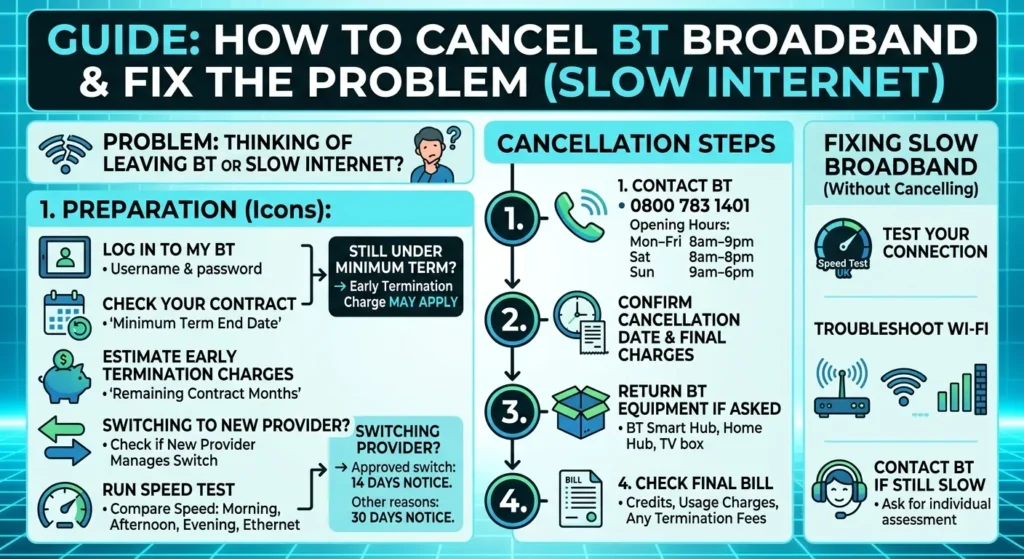
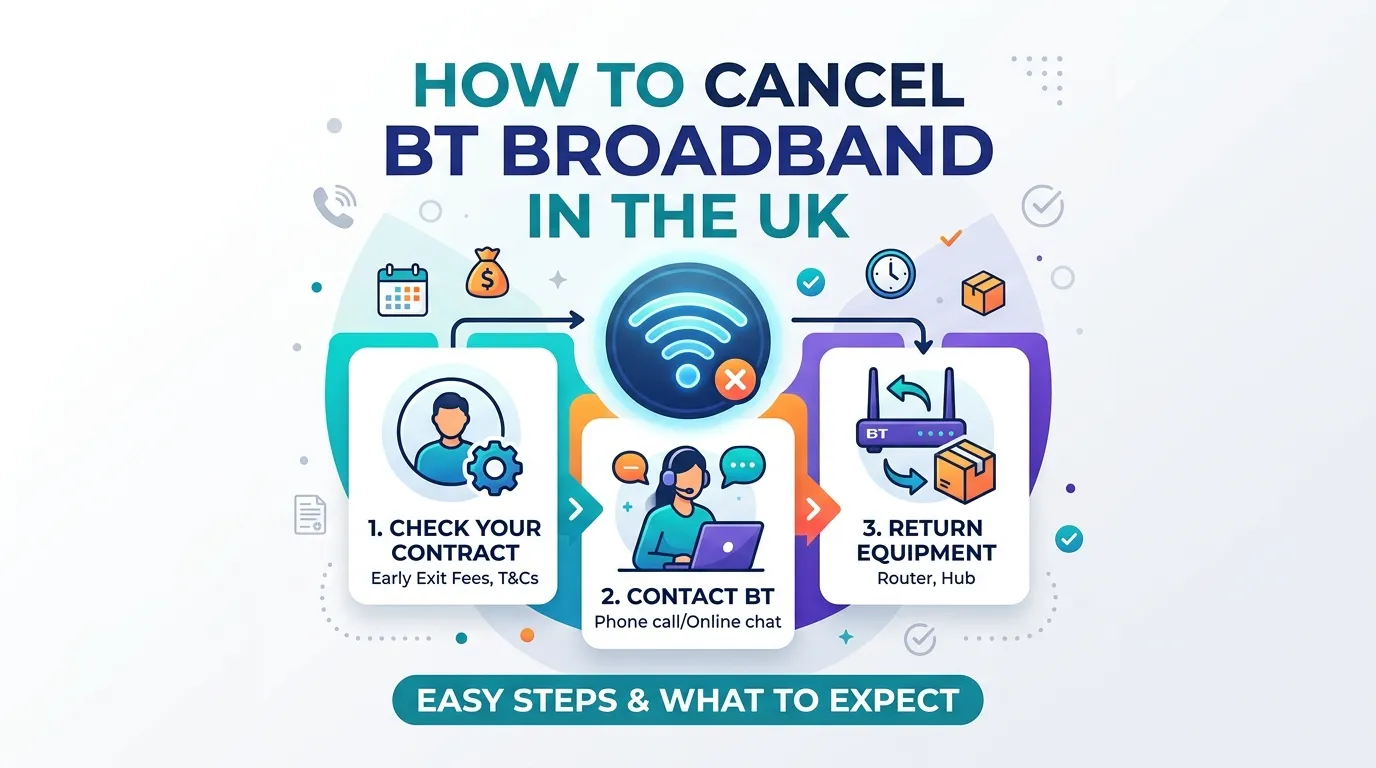
The basic cancellation process is:
- Check your BT contract.
- Find your minimum contract end date.
- Check whether an early termination charge could apply.
- Decide whether you are cancelling completely or switching provider.
- Contact BT to arrange the cancellation if required.
- Confirm your cancellation date.
- Return BT equipment if BT asks you to.
- Check your final bill.
BT says customers who want to cancel their service will usually need to speak to BT. BT will confirm the cancellation date and explain any final charges.
Check Your BT Contract Before Cancelling
Before cancelling, log in to My BT and check your contract details.
The most important information is your minimum term and the date that term ends.
BT says broadband contracts commonly have minimum terms, and leaving before the end of the minimum period can result in an early termination charge.
Your contract information can help you answer:
- When does my BT contract end?
- Am I still inside the minimum term?
- Could I have to pay an early termination charge?
- When can I leave without an early termination charge?
- What services are included in my package?
Checking this information first can prevent an unexpected bill.
How Much Notice Do You Need to Give BT?
For a normal cancellation, BT says you need to give 30 days’ notice.
Your BT service normally continues during that notice period and stops on the agreed cancellation date.
For example, if you give BT notice on 1 September, your service may continue until the end of the applicable notice period.
The exact date should be confirmed with BT when you cancel.
What If You Are Switching Broadband Provider?
If you are switching to another provider through an approved switching process, the notice period can be different.
BT’s terms state that an approved switch can use a 14-day notice period, while cancelling for another reason normally requires 30 days’ notice.
In many standard switches, the new provider manages the switching process.
However, if you are moving to a provider or network where you need to contact BT separately, check the switching instructions before cancelling.
What Is the BT Cancellation Phone Number?
BT’s current help information lists 0800 783 1401 for customers who want to leave BT.
BT lists the following opening hours:
| Day | Opening hours |
|---|---|
| Monday–Friday | 8am–9pm |
| Saturday | 8am–8pm |
| Sunday | 9am–6pm |
BT also lists +44 150 174 7714 for customers calling from outside the UK.
Contact information can change, so check BT’s current help page before calling.
Will BT Charge Me for Cancelling?
It depends on your contract and when you leave.
If you are outside your minimum contract period, you may not have an early termination charge.
If you cancel before the end of your minimum term, BT says an early termination charge may apply.
BT explains that the charge is generally based on the remaining amount you would have paid during your minimum contract period, although the exact calculation depends on your service and contract.
Example of an Early Termination Charge
Imagine that:
- Your minimum term has several months remaining.
- Your broadband service costs a certain amount each month.
- You decide to cancel before the minimum term ends.
BT may calculate an early termination charge based on the remaining contractual period.
The actual amount should be confirmed by BT because it depends on your individual contract.
BT Cancellation Fees at a Glance
| Situation | What may happen |
|---|---|
| Contract has ended | Normal cancellation may not have an early termination fee |
| Still inside minimum term | Early termination charge may apply |
| Standard cancellation | Usually 30 days’ notice |
| Approved switch to another provider | 14-day notice can apply |
| New BT order within cooling-off period | Cancellation rights may apply |
| Equipment needs returning | BT may ask you to return it |
| Final bill | You should receive a final bill |
BT’s current guidance should be checked for your specific account because contract terms can vary.
Can I Cancel BT Broadband Within 14 Days?
If you have recently ordered BT Broadband, different cancellation rules can apply.
BT says that for a new package, you can cancel within 14 days after your service starts or when you receive your equipment, whichever is later, subject to the applicable terms.
If BT has already sent you equipment, you may need to return it.
BT says equipment should be returned according to its instructions and may need to be undamaged and in its original packaging for certain cancellation situations.
Do I Need to Return My BT Hub?
After cancelling, BT may require you to return equipment.
This can include equipment such as:
- BT Smart Hub
- BT Home Hub
- TV equipment
- Other BT-provided equipment
The exact equipment you need to return depends on your BT services.
Follow the return instructions provided by BT rather than sending equipment to an address you find elsewhere online.
What Happens to Your BT Broadband After Cancellation?
Once your cancellation has been processed, BT will confirm the date your broadband service will stop.
BT says that after cancellation:
- Your service stops on the agreed date.
- You may need to return equipment.
- You receive a final bill.
If you still need internet access, make sure your new broadband service is ready before your BT connection ends.
Should You Cancel BT Before Switching?
If you are moving to another broadband provider, do not automatically cancel BT first.
For many standard switches, the new provider handles the switching process.
BT says that if you switch to another provider, the new provider may handle the switch.
BT also explains that some moves require you to tell BT yourself, depending on the provider and network involved.
Before cancelling, ask your new provider whether they will manage the switch.
What Happens If I Switch From BT to Another Provider?
The process depends on the provider you are moving to.
A typical switch looks like this:
Choose new provider → Check availability → Order new broadband → New provider manages switch where applicable → BT service ends → New service starts
Try to avoid cancelling too early if you need continuous internet access.
Ask your new provider about:
- Activation date
- Installation date
- Engineer appointment
- Router delivery
- Switching process
- Any downtime
- Whether they will contact BT
Check Your New Broadband Before Cancelling
Before leaving BT, check that your new provider can supply broadband at your address.
Important things to compare include:
| Factor | Why it matters |
|---|---|
| Download speed | Affects browsing, streaming and downloads |
| Upload speed | Useful for video calls and uploading files |
| Latency | Important for gaming and real-time applications |
| Full Fibre availability | Can provide higher speeds |
| Contract length | Determines how long you are committed |
| Monthly price | Compare the full cost |
| Installation | Check if an engineer is needed |
| Router | Check what equipment is included |
Do not choose a broadband package based only on its advertised maximum speed. Check what is actually available at your address.
Test Your BT Internet Before You Leave
If you are cancelling BT because you believe your broadband is too slow, run a speed test first.
Speed Test UK provides a simple way to check your current internet connection.
You can measure:
- Download speed
- Upload speed
- Ping
- Latency
- General connection performance
This gives you useful information before contacting BT or moving to another provider.
Why Use Speed Test UK?
Speed Test UK is built for users who want a quick way to check their internet connection.
If your reason for leaving BT is slow broadband, you can run the test several times and record your results.
For example:
| Test | What to check |
|---|---|
| Morning | Normal daytime speed |
| Afternoon | Compare daytime performance |
| Evening | Compare busy-period performance |
| Ethernet | Reduce Wi-Fi variables |
| Wi-Fi | Check your normal device connection |
A speed test does not decide whether you should stay with or leave BT. It simply provides useful information about the connection you are currently using.
What If BT Broadband Is Slow?
If slow internet is the reason you want to cancel, consider troubleshooting the problem first.
A slow connection can sometimes be caused by Wi-Fi rather than the broadband service itself.
Possible causes include:
- Weak Wi-Fi signal
- Distance from the Hub
- Walls or floors between the device and Hub
- Too many connected devices
- Background downloads
- Older Wi-Fi equipment
- Device limitations
- Broadband line problems
Testing with Ethernet can help separate a Wi-Fi problem from a broadband connection problem.
If the speed is still consistently poor, contact BT and ask them to investigate the connection.
Can Poor BT Broadband Give You a Reason to Leave?
BT’s terms contain circumstances where customers may be able to end a broadband agreement without an early termination charge.
For example, BT states that if a customer has regular or repeated faults, or if BT agrees that the service standard is consistently below what could reasonably be expected, BT may allow the customer to end the agreement without an early cancellation charge after an individual assessment.
BT also states that if a customer is regularly receiving download speeds below the minimum guaranteed line access speed after following BT’s troubleshooting instructions, there can be circumstances where the agreement can be ended without an early cancellation charge.
This does not mean every slow-speed complaint automatically qualifies.
Your individual contract and circumstances matter.
What Is the BT Final Bill?
After your service ends, BT will issue a final bill.
Your final bill can include:
- Normal service charges
- Charges for usage
- Cancellation charges if applicable
- Equipment charges where applicable
- Credits or refunds
BT explains that a final bill can initially show charges for a full billing period because services are billed in advance. If your service ends before the period covered by that bill, BT says the difference can be refunded.
Check the final bill carefully before assuming that every amount shown is an additional cancellation fee.
What If I Have a BT Bundle?
If your BT account includes multiple services, cancelling broadband can affect the rest of your package.
For example, your package might include:
- Broadband
- Home phone
- Digital Voice
- TV
- Calling features
- Other add-ons
Before cancelling broadband, ask BT what happens to the other services.
BT’s support page covers changes and cancellations for phone, TV and broadband packages.
How to Cancel BT Broadband: Simple Checklist
Use this checklist before you leave BT.
| Step | Action |
|---|---|
| 1 | Log in to My BT |
| 2 | Check your contract end date |
| 3 | Check your minimum term |
| 4 | Check possible early termination charges |
| 5 | Decide whether you are switching provider |
| 6 | Ask your new provider if they handle the switch |
| 7 | Run a BT speed test if slow broadband is the reason |
| 8 | Contact BT to arrange cancellation if required |
| 9 | Confirm the cancellation date |
| 10 | Return BT equipment if requested |
| 11 | Check your final bill |
| 12 | Keep confirmation of your cancellation |
Frequently Asked Questions
How do I cancel BT broadband?
Check your contract and minimum term first. BT says customers normally need to contact BT to cancel, and you should confirm the cancellation date and any final charges.
How much notice do I need to cancel BT broadband?
BT normally requires 30 days’ notice when cancelling for reasons other than an approved switch to another provider.
Can I cancel BT broadband without paying a fee?
If you are outside your minimum contract period, you may not have an early termination charge. If you leave during the minimum term, an early termination charge may apply. Certain contract circumstances can provide other cancellation rights.
What is the BT cancellation phone number?
BT currently lists 0800 783 1401 for customers who want to leave BT. Its listed opening hours are Monday to Friday 8am–9pm, Saturday 8am–8pm and Sunday 9am–6pm.
Can I cancel BT broadband online?
BT’s guidance says that you will usually need to speak to BT to cancel your service. You can use My BT to check your services and contract details before contacting BT.
Should I cancel BT before switching to another broadband provider?
Not necessarily. For many standard switches, your new provider handles the switching process. Check with the new provider before cancelling BT yourself.
How long does it take to cancel BT broadband?
For a normal cancellation, BT says you need to give 30 days’ notice. The exact service-stop date should be confirmed when you arrange your cancellation.
Do I have to return my BT Hub?
BT may require you to return equipment after cancellation. Follow BT’s equipment-return instructions for your account.
Can I cancel a new BT broadband order?
BT says a new package can generally be cancelled within 14 days after the service starts or when you receive the equipment, whichever is later, subject to the applicable terms. Equipment may need to be returned.
Should I run a speed test before cancelling BT?
If slow internet is the reason you are leaving, running a speed test is useful. It gives you information about your current download speed, upload speed and latency and can help you understand the problem before cancelling.
Can Speed Test UK test BT broadband?
Yes. You can use Speed Test UK to check the internet connection you are currently using. Run the test more than once if you want to compare your connection at different times.
Conclusion
If you want to know how to cancel BT broadband, start by checking your BT contract and minimum term in My BT. BT says normal cancellations generally require 30 days’ notice, while an approved switch to another provider can have a 14-day notice period. An early termination charge may apply if you leave during your minimum contract period.
If you are leaving because your BT internet is slow, consider running a Speed Test UK test before cancelling. Your results can help you understand your current connection and give you useful information if you decide to contact BT about the problem.
If you are switching to another provider, check whether the new provider will manage the switch before you cancel BT yourself. After cancellation, confirm your service-stop date, return any equipment BT requests and check your final bill.
The simple process is:
Check contract → Check cancellation charges → Test your connection → Arrange your switch or cancellation → Confirm the date → Return equipment → Check final bill.
BT’s cancellation rules and contact details can change, so customers should verify the latest information with BT before completing a cancellation.
Select your broadband provider and check your internet speed with our
dedicated UK speed test.
Check your BT broadband speed. Check your EE broadband speed. Check your Sky broadband speed. Check your Virgin Media speed. Check your Vodafone broadband speed. Check your Plusnet broadband speed. Check your TalkTalk broadband speed. Check your Zen broadband speed.
Check your internet connection with our fast and easy-to-use testing tools.
UK Broadband Provider Speed Tests
BT Broadband
EE Broadband
Sky Broadband
Virgin Media
Vodafone UK
Plusnet
TalkTalk
Zen Internet
Popular Speed Test Tools