If you are moving home, changing broadband providers, or simply looking for a faster connection, you may be asking, “What broadband can I get?”
The answer depends on your address.
Different parts of the UK have access to different broadband technologies and speeds. One house may have full-fibre broadband, while another house nearby may only have part-fibre or older broadband technology.
The good news is that checking broadband availability is usually simple.
You can use your postcode and full address to find out what broadband services may be available at your property. Check Your Internet Speed.
What Broadband Can I Get at My Address?
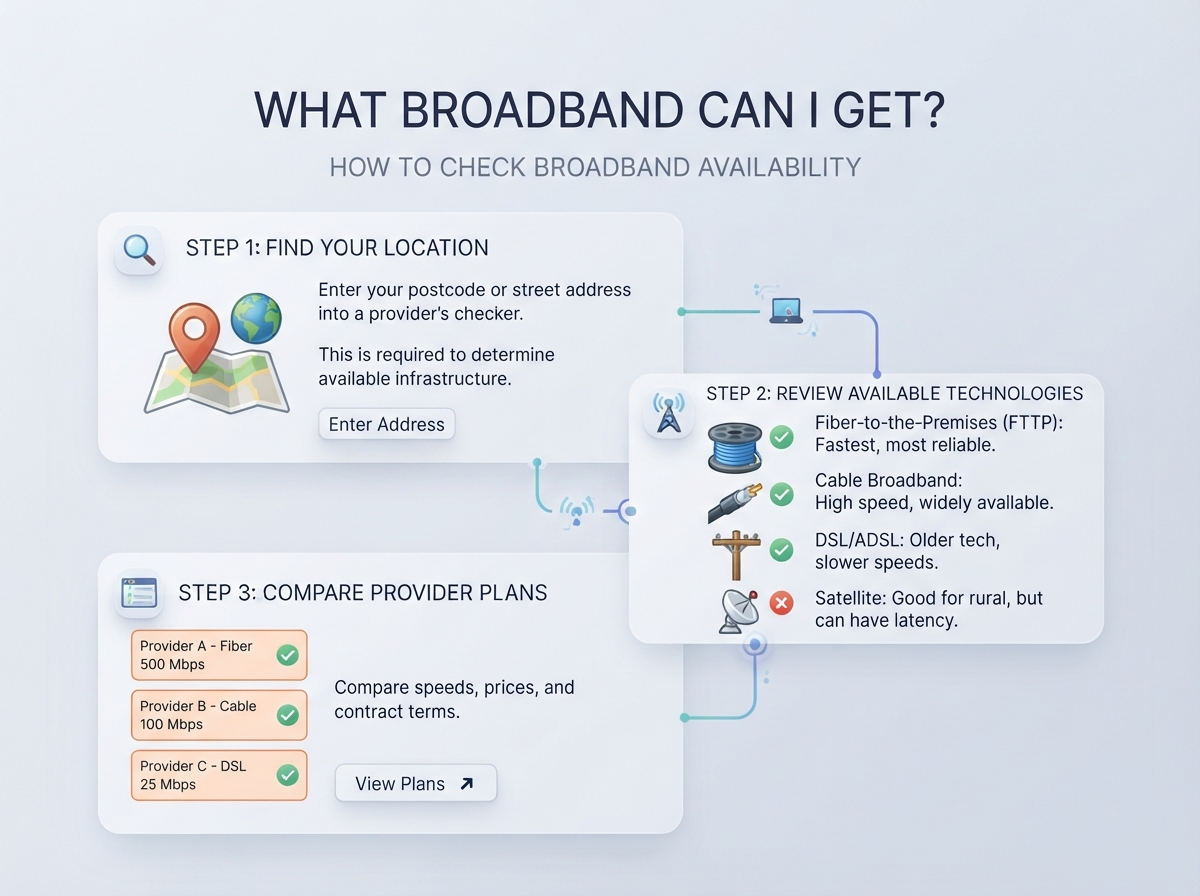
The easiest way to find out what broadband you can get is to use a broadband availability checker.
Most broadband providers ask for:
- Your postcode
- Your house number or name
- Your full address
The checker can then show broadband services available at that specific property.
Your results may include:
| Broadband Type | What It Means |
|---|---|
| ADSL | Broadband delivered through a traditional phone line |
| Fibre to the Cabinet (FTTC) | Fibre runs to a street cabinet, then copper cable to the property |
| Full Fibre | Fibre runs directly to the property |
| Cable | Broadband delivered through a cable network |
| 4G/5G Broadband | Internet delivered through a mobile network |
| Satellite | Internet delivered through a satellite connection |
Availability can vary even between nearby homes, so checking your exact address is important.
How to Check Broadband Availability in the UK
Follow these simple steps:
- Find your postcode.
- Open a broadband provider’s availability checker.
- Enter your postcode.
- Select your exact address.
- Review the available broadband services.
- Compare the speeds and packages.
- Check any installation information.
- Look at the contract length and monthly cost before signing up.
You can also check more than one provider because different providers may use different networks.
Why Does Broadband Availability Depend on Your Address?
Broadband networks are not available everywhere in the same way.
Your location can affect:
- Broadband technology
- Maximum download speed
- Upload speed
- Network availability
- Installation options
- Number of providers
- Connection type
For example, a property with full-fibre coverage may have access to much faster broadband than a property that only has older copper-based broadband.
This is why entering your exact address is more useful than simply searching for broadband in your town.
What Is Full-Fibre Broadband?
Full fibre, also called Fibre to the Premises (FTTP) or Fibre to the Home (FTTH), uses fibre-optic cable all the way to your property.
This is different from FTTC, where fibre only goes as far as a nearby street cabinet.
Full fibre can offer high download and upload speeds and is increasingly available across the UK.
However, the exact speeds and packages available depend on the network serving your address.
What Is Fibre Broadband?
The word fibre can refer to more than one type of broadband.
Two common types are:
Fibre to the Cabinet
With FTTC, fibre connects to a street cabinet. The final part of the connection uses copper cable.
The distance between your property and the cabinet can affect the connection speed.
Full Fibre
With full fibre, the fibre connection continues directly to your property.
This can support much higher speeds than many older connections.
When comparing broadband packages, check whether the provider means FTTC or full fibre.
What Is ADSL Broadband?
ADSL is an older type of broadband that uses traditional copper telephone lines.
It is still available in some areas, but many UK properties now have access to newer broadband technologies.
ADSL speeds are generally much lower than modern full-fibre services.
If a broadband checker shows only older broadband options at your address, you may want to check whether fibre, fixed wireless, mobile broadband or another technology is available.
What Is FTTC Broadband?
FTTC means Fibre to the Cabinet.
The fibre cable goes from the provider’s network to a cabinet in your area. A copper cable then connects the cabinet to your property.
FTTC is usually faster than older ADSL connections, but its performance can depend on the distance between your property and the cabinet.
What Is Full Fibre vs FTTC?
The main difference is where the fibre cable ends.
| Feature | FTTC | Full Fibre |
|---|---|---|
| Fibre reaches | Street cabinet | Property |
| Final connection | Usually copper | Fibre |
| Potential speed | Lower than many full-fibre services | Often much higher |
| Upload performance | Depends on package | Often higher |
| Technology | Fibre + copper | Fibre |
| Availability | Depends on area | Depends on area |
Always check the exact package offered at your address rather than assuming a particular speed.
What Broadband Speed Can I Get?
The maximum broadband speed available depends on your network and address.
A provider may advertise a range of speeds rather than one guaranteed speed.
For example, a package may be described as:
- 100 Mbps
- 150 Mbps
- 300 Mbps
- 500 Mbps
- 900 Mbps
- 1 Gbps
These numbers describe the advertised connection speed. Your actual speed can be affected by Wi-Fi, network conditions, equipment and other factors.
What Broadband Speed Do I Need?
You do not necessarily need the fastest broadband package available.
Your ideal speed depends on how you use the internet.
| Usage | Broadband Requirement |
|---|---|
| Email and web browsing | Basic broadband may be enough |
| Social media | Basic to moderate speed |
| HD streaming | Moderate speed |
| 4K streaming | Higher speed |
| Video calls | Stable connection is important |
| Online gaming | Good latency and stable connection matter |
| Large downloads | Higher download speed is useful |
| Large household | Higher speed may be useful |
A household with several people streaming video, gaming, working from home and using smart devices at the same time may need more capacity than a single light internet user.
Can I Get Full Fibre Broadband?
The only reliable way to know whether full fibre is available at your property is to check your address with a relevant broadband availability checker.
Do not assume that full fibre is available just because a nearby house has it.
Network rollout can happen street by street, and availability may differ between properties.
Why Can My Neighbour Get Faster Broadband?
This is a common question.
Two homes that are very close together can sometimes have different broadband options.
Possible reasons include:
- Different network coverage
- Different network infrastructure
- Different connection points
- Network rollout stages
- Property-specific availability
- Different broadband providers
Checking your own address is therefore important.
What Broadband Providers Are Available in the UK?
| Company Name | Company Link | Area in the UK | Notes |
|---|---|---|---|
| BT | BT Broadband | England, Scotland, Wales & Northern Ireland | Major UK broadband provider offering Full Fibre and other broadband services. Availability and speeds depend on your address. |
| EE | EE Broadband | UK-wide, subject to local availability | Offers broadband alongside its wider connectivity services. Exact broadband options depend on your address. |
| Sky Broadband | Sky Broadband | Many areas across the UK | Broadband availability and speeds vary by property and network coverage. |
| Vodafone | Vodafone Broadband | Many areas across the UK | Offers part-fibre and full-fibre broadband, with availability and maximum speeds depending on your address. |
| Virgin Media | Virgin Media Broadband | Selected areas across the UK | Uses its own broadband network in areas where its services are available. Check your address for availability. |
| Plusnet | Plusnet Broadband | Many areas across the UK | UK broadband provider and BT Group brand. Availability depends on the address and network. |
| TalkTalk | TalkTalk Broadband | Many areas across the UK | Offers broadband services using available network infrastructure. Exact packages vary by address. |
| Zen Internet | Zen Internet | Many areas across the UK | Provides broadband services including fibre options where available. Address checking is required. |
| Regional & Independent Providers | Check local provider websites | Selected towns, cities and rural areas | Smaller providers may offer fibre, fixed wireless or other services in specific locations. |
Important: Not every provider in this table will be available at every UK address. Ofcom’s broadband checker can be used to check the broadband services available in a specific area, and its results can include standard, superfast and ultrafast services.
How Do I Compare Broadband Providers?
Once you know what broadband is available, compare more than just the advertised download speed.
Look at:
| Feature | Why It Matters |
|---|---|
| Download speed | Affects downloads and streaming |
| Upload speed | Useful for video calls and uploading files |
| Monthly price | Shows your regular broadband cost |
| Contract length | Determines how long you are committed |
| Setup fee | May increase the initial cost |
| Router | Check what equipment is included |
| Installation | Check whether installation is included |
| Customer support | Useful when something goes wrong |
| Data limits | Important if the package has restrictions |
| Price after promotion | Important when an introductory deal ends |
Reading the full package information can help you understand the actual cost.
What Is the Difference Between Download and Upload Speed?
Download speed measures how quickly data can come to your device.
It is important for:
- Streaming
- Browsing
- Downloading files
- Online gaming updates
- App downloads
Upload speed measures how quickly data can leave your device.
It can be important for:
- Video calls
- Uploading photos
- Sending large files
- Cloud backups
- Streaming your own content
For many everyday users, download speed gets more attention, but upload speed can also matter.
Does Broadband Speed Affect Online Gaming?
Speed matters, but it is not the only factor.
Online gaming can also depend heavily on:
- Ping
- Latency
- Jitter
- Packet loss
- Connection stability
A very fast connection can still feel poor for gaming if latency or packet loss is high.
If gaming is important to you, consider checking your ping and connection quality, not just your download speed.
What Broadband Can I Get in a Rural Area?
Broadband availability can vary considerably in rural locations.
Depending on the area, options may include:
- Full fibre
- FTTC
- Fixed wireless
- 4G broadband
- 5G broadband
- Satellite broadband
The available options depend on local network coverage.
If traditional wired broadband options are limited, checking wireless and satellite alternatives may be useful.
Can I Get 4G or 5G Broadband at Home?
Yes, in some areas.
4G and 5G home broadband uses a mobile network rather than a traditional fixed broadband connection.
You normally use a dedicated router or home broadband device with a SIM.
Performance can depend on:
- Mobile coverage
- Network congestion
- Indoor signal
- Router location
- Local network capacity
Check coverage and expected service at your property before choosing this type of broadband.
Can I Get Broadband Without a Phone Line?
Yes.
Many modern broadband services do not require a traditional telephone line.
Full-fibre services, cable broadband and some 4G or 5G home broadband services can provide internet without a traditional copper phone connection.
The exact installation depends on the provider and network available at your address.
What If No Fibre Broadband Is Available?
If full fibre is not available, you may still have other options.
You could check for:
- FTTC
- ADSL
- Cable
- 4G broadband
- 5G broadband
- Fixed wireless
- Satellite broadband
It is worth checking again from time to time because broadband networks continue to expand.
How Often Should I Check Broadband Availability?
If full fibre is not currently available, you can check again later.
Network availability changes as providers expand their networks.
You may also receive information from providers when a new service becomes available in your area.
What Should I Check Before Ordering Broadband?
Before signing up, check:
- Exact availability at your address.
- Download speed.
- Upload speed.
- Contract length.
- Monthly price.
- Price after any introductory offer.
- Installation cost.
- Router information.
- Cancellation terms.
- Any additional charges.
Do not choose a package based only on the highest advertised speed.
Broadband Availability Quick Checklist
Use this checklist when searching for broadband:
- Enter your exact postcode.
- Select your exact address.
- Check whether full fibre is available.
- Check the advertised download speed.
- Check the upload speed.
- Compare several providers.
- Check the monthly price.
- Check the contract length.
- Check installation costs.
- Check the price after any promotional period.
- Read the provider’s terms before ordering.
Frequently Asked Questions
What broadband can I get at my address?
Enter your postcode and exact address into a broadband availability checker. The results should show the types of broadband and packages available at your property.
How do I check broadband availability in my area?
Use a provider or broadband availability checker and enter your postcode and address. You can also check several providers because availability may differ between networks.
Can I get full fibre broadband?
It depends on your address. Check your exact property with a full-fibre availability checker to see whether a full-fibre service is available.
Why can’t I get the same broadband as my neighbour?
Broadband availability can vary between properties because networks, infrastructure and rollout areas are not always identical.
What is the fastest broadband I can get?
The maximum speed depends on the network and broadband packages available at your address. Check your exact address rather than relying on availability in your general area.
Is full fibre better than FTTC?
Full fibre and FTTC use different network designs. Full fibre takes fibre directly to the property, while FTTC normally uses fibre to a cabinet and copper for the final connection.
Can I get broadband without a landline?
Yes. Some full-fibre, cable, 4G and 5G broadband services do not require a traditional telephone line.
What if fibre broadband is not available?
You can check other options such as FTTC, ADSL, 4G, 5G, fixed wireless or satellite broadband, depending on what is available at your location.
Can broadband availability change?
Yes. Network operators continue to expand and upgrade broadband networks, so a service that is unavailable today may become available later.
How do I know which broadband speed I need?
Think about how many people use your connection and what they do online. Streaming, gaming, video calls and large downloads may require more capacity than basic browsing and email.
Important Points
- Broadband availability is address-specific.
- Your postcode alone may not show every available option.
- Full fibre and FTTC are different technologies.
- Check both download and upload speeds.
- Compare several providers where possible.
- Look at the total cost, not only the promotional price.
- Check contract length and installation charges.
- Rural homes may have additional wireless or satellite options.
- A faster package is not automatically necessary for every household.
- Broadband availability can change as networks expand.
Conclusion
If you are asking “What broadband can I get?”, the best place to start is your exact address.
Enter your postcode and property details into broadband availability checkers to see whether you can get full fibre, FTTC, cable, ADSL, 4G, 5G or another type of broadband.
Once you know what is available, compare speed, upload performance, price, contract length, installation costs and other terms.
Most importantly, do not assume that broadband availability is the same everywhere in your town or even on your street. Your exact address is what matters.
Check your internet connection with our fast and easy-to-use testing tools.
Popular Speed Test Tools