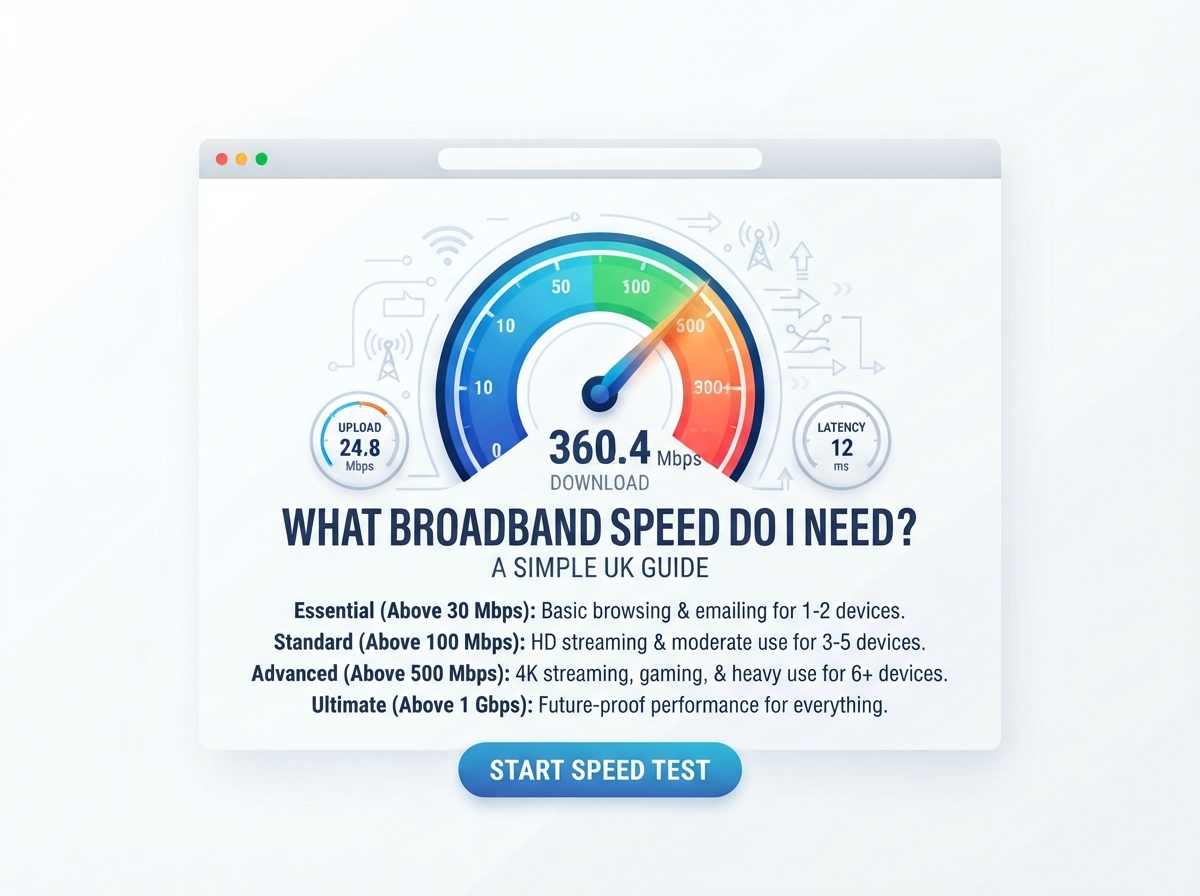
If you are choosing a broadband package, you may be asking, “What broadband speed do I need?”
The answer depends on how you use the internet, how many people live in your home, and how many devices are connected at the same time.
A person who mainly checks emails and browses websites does not need the same broadband speed as a family that streams 4K video, plays online games, works from home and downloads large files.
In the UK, broadband services are commonly described by their download speed in Mbps, or megabits per second. Ofcom currently groups services into standard broadband up to 30 Mbit/s, superfast broadband from 30 to 300 Mbit/s, and ultrafast broadband above 300 Mbit/s.
The best way to understand your current connection is to use an internet speed test and compare your actual download and upload speeds with the needs of your household.
Quick Answer: What Broadband Speed Do I Need?
As a simple starting point:
| Household or usage | Suggested broadband speed |
|---|---|
| One light user | 10–25 Mbps |
| One or two normal users | 25–50 Mbps |
| Small family | 50–100 Mbps |
| Family with several devices | 100–300 Mbps |
| Large busy household | 300 Mbps+ |
| Very heavy users | 500 Mbps–1 Gbps+ |
These are general guidelines, not strict rules.
Ofcom also gives activity-based guidance. Its current consumer guide says standard broadband can be enough for basic browsing, email and standard video, while superfast broadband suits many everyday activities such as working from home, video calls and streaming. Ultrafast connections can be useful when several people are online at once or when a household streams heavily, plays games online or downloads large files.
What Does Broadband Speed Mean?
Broadband speed tells you how quickly data can travel through your internet connection.
It is normally measured in Mbps.
For example:
- 10 Mbps means 10 megabits per second.
- 50 Mbps means 50 megabits per second.
- 100 Mbps means 100 megabits per second.
- 500 Mbps means 500 megabits per second.
- 1 Gbps means 1,000 Mbps.
A higher number generally means more available bandwidth.
However, a higher advertised speed does not automatically mean that every device in your home will receive that speed.
Your Wi-Fi signal, router, device, network conditions and the service you are accessing can all affect your real-world experience.
How Much Broadband Speed Do I Need for Basic Internet Use?
If you mainly use the internet for simple activities, you may not need a very fast connection.
Basic activities include:
- Reading websites
- Checking email
- Online banking
- Shopping
- Social media
- Reading news
- Listening to music
- Sending messages
A lower-speed connection can be enough for these activities.
The situation changes when several people are using the connection at the same time.
How Much Speed Do I Need for Streaming?
Streaming video uses download bandwidth.
The required speed depends on video quality and how many people are streaming at the same time.
| Streaming activity | General speed consideration |
|---|---|
| Standard video | Around 3 Mbps |
| HD video | Around 5–10 Mbps |
| 4K/UHD video | Around 25 Mbps per stream |
| Several HD streams | 25–50+ Mbps |
| Several 4K streams | 100 Mbps+ may be useful |
These figures are general guidance. The actual requirement can vary between streaming services and devices.
If one person watches 4K video, a connection around 25 Mbps may provide enough bandwidth for that activity.
If several people stream high-quality video at the same time, you need to consider the combined demand.
What Broadband Speed Do I Need for a Family?
A family normally needs more bandwidth because multiple people can use the internet at the same time.
For example, imagine a home where:
- One person watches Netflix.
- One person plays an online game.
- One person joins a video meeting.
- A smart TV is connected.
- Phones are downloading updates.
- Someone is browsing social media.
All of these activities can happen at the same time.
A faster connection gives the household more bandwidth to share.
| Household size | Typical usage | General speed range |
|---|---|---|
| 1 person | Light use | 10–25 Mbps |
| 1–2 people | Normal use | 25–50 Mbps |
| 2–4 people | Streaming and browsing | 50–100 Mbps |
| 3–5 people | Multiple devices | 100–300 Mbps |
| 5+ people | Heavy simultaneous use | 300 Mbps+ |
The number of people is only part of the answer. Two people who use the internet heavily may need more bandwidth than five people who mainly browse websites.
What Broadband Speed Do I Need for Working From Home?
Working from home usually requires a stable connection rather than simply the highest possible download speed.
Common work activities include:
- Video meetings
- Cloud applications
- File sharing
- Remote desktop
- Web browsing
- Uploading documents
- Downloading work files
For one person, a broadband connection in the tens of Mbps can often provide enough bandwidth for normal remote work.
If several people work from home at the same time, higher speeds may be useful.
Upload speed is also important for video calls and sending files.
What Broadband Speed Do I Need for Video Calls?
Video calls use both download and upload bandwidth.
They are also affected by latency, jitter and packet loss.
If your video call keeps freezing or the audio becomes unclear, the problem may not simply be a lack of download speed.
Possible causes include:
- Weak Wi-Fi
- High latency
- High jitter
- Packet loss
- Network congestion
- Too many connected devices
A stable connection is important for good video-call performance.
What Broadband Speed Do I Need for Online Gaming?
Online gaming is often misunderstood.
You do not always need extremely high download speed to play an online game.
Gamers should also pay attention to:
- Ping
- Latency
- Jitter
- Packet loss
- Connection stability
- Download speed
A low-latency, stable connection can be more important for gameplay than having the highest possible Mbps.
However, downloading large games and updates is different.
A faster download connection can reduce the time needed to download large game files.
What Broadband Speed Do I Need for 4K Streaming?
4K video uses considerably more bandwidth than standard or HD video.
As a simple guide, around 25 Mbps per 4K stream is a useful starting point.
For example:
| Number of 4K streams | Approximate bandwidth consideration |
|---|---|
| 1 | Around 25 Mbps |
| 2 | Around 50 Mbps |
| 3 | Around 75 Mbps |
| 4 | Around 100 Mbps |
This does not include other internet activity in the home.
If your household watches 4K video while people are gaming, working or downloading files, additional bandwidth may be useful.
What Broadband Speed Do I Need for Netflix?
Streaming services generally require less bandwidth than many people expect.
The exact requirement depends on video quality and the service.
For a household, it is more useful to think about total simultaneous usage rather than one device.
For example, one 4K stream may use around 25 Mbps, but three or four simultaneous high-quality streams can require much more.
Other devices may also use bandwidth in the background.
What Broadband Speed Do I Need for YouTube?
YouTube speed requirements depend on video quality.
Watching standard or HD videos normally requires much less bandwidth than watching several 4K videos at the same time.
A connection of 25–50 Mbps can provide plenty of bandwidth for many individual users.
A family with several people watching high-resolution videos may benefit from more.
What Broadband Speed Do I Need for Zoom and Video Meetings?
Video meetings require both download and upload bandwidth.
They also depend on connection stability.
For work meetings, you should consider:
- Download speed
- Upload speed
- Ping
- Jitter
- Wi-Fi signal
- Number of other users
If you work from home and regularly attend video meetings, a stable broadband connection is more important than simply choosing the package with the largest advertised download number.
What Broadband Speed Do I Need for Uploading Files?
Upload speed becomes important when you send data to the internet.
You may notice upload performance when:
- Uploading videos
- Sending large files
- Backing up photos
- Using cloud storage
- Live streaming
- Sharing work files
A connection with fast download but very slow upload may still feel limited for these activities.
This is one reason full-fibre broadband can be attractive for people who regularly upload large amounts of data.
Download Speed vs Upload Speed
Download and upload speeds do different jobs.
| Speed | What it does | Common examples |
|---|---|---|
| Download | Data comes to your device | Streaming, browsing, downloads |
| Upload | Data leaves your device | Video calls, cloud backup, uploads |
Most everyday internet activities use more download bandwidth than upload bandwidth.
However, upload speed can be very important for remote workers, streamers, content creators and people who regularly send large files.
What Is Ping and Why Does It Matter?
Ping, also called latency, measures how long data takes to travel between your device and a server.
It is measured in milliseconds.
Lower latency generally means a faster response.
Ping can be particularly important for:
- Online gaming
- Video calls
- Voice calls
- Remote desktop
- Live communication
You can have a fast broadband package and still experience delays if latency is high.
What Is Jitter?
Jitter measures changes in latency.
For example, if your ping keeps moving between 20 ms and 100 ms, the connection may be less stable for real-time applications.
High jitter can contribute to:
- Choppy calls
- Audio problems
- Gaming issues
- Unstable live communication
This is why checking more than download speed can help you understand your connection.
What Is the Difference Between Fibre and Full Fibre?
Not all fibre broadband is the same.
FTTC
FTTC means Fibre to the Cabinet.
Fibre runs to a street cabinet, with the final connection to your property using another type of cable.
The available performance can depend on factors such as distance from the cabinet.
Full Fibre
Full Fibre, often called FTTP or FTTH, uses fibre all the way to the property.
Full-fibre networks can support very high download and upload speeds.
Ofcom reported that full-fibre networks were available to around 82% of UK residential premises in January 2026. However, availability still depends on the specific address.
What Broadband Speed Do I Need in a Small Flat?
If you live alone or with one other person, you may not need an extremely fast broadband package.
For basic browsing, social media, streaming and video calls, a moderate connection can be enough.
A speed around 25–100 Mbps may suit many small households, depending on how heavily the connection is used.
What Broadband Speed Do I Need in a Large House?
A large home may have more people and more connected devices.
You may have:
- Smart TVs
- Phones
- Tablets
- Computers
- Games consoles
- Security cameras
- Smart speakers
- Streaming devices
If many devices are active simultaneously, a higher-speed broadband package may be useful.
But remember that Wi-Fi coverage also matters.
A fast broadband connection will not automatically provide strong Wi-Fi in every room.
Why Is My Broadband Slower Than Advertised?
Your speed test result can be lower than the speed advertised for your package.
Possible reasons include:
Wi-Fi
Wi-Fi can reduce the speed reaching your device because of distance, walls and interference.
Router
Your router’s hardware and wireless technology can affect performance.
Device
Older phones, laptops and computers may have limitations.
Network Traffic
Internet activity can change throughout the day.
Other Users
Someone else in your home may be downloading, streaming or uploading files.
Test Conditions
Different speed-test servers and testing methods can produce different results.
Ofcom recommends using an Ethernet connection for the most accurate possible speed test because Wi-Fi can slow the signal.
How Can I Check My Broadband Speed?
The easiest way is to use an internet speed test.
For a more useful result:
- Connect your device to your router.
- Use Ethernet if possible.
- Stop large downloads.
- Pause streaming.
- Close apps using the internet.
- Run the speed test.
- Check download speed.
- Check upload speed.
- Check ping.
- Repeat the test if needed.
Testing at different times can help you understand your normal connection.
What Should I Do If My Broadband Is Too Slow?
If your internet seems slower than expected, do not immediately assume you need a faster package.
First:
- Restart your router.
- Test close to the router.
- Try Ethernet.
- Stop background downloads.
- Disconnect unused devices.
- Test again.
- Test at different times.
If your results remain much lower than expected, contact your broadband provider.
Ofcom says broadband customers should receive information about expected speeds when buying a service, and participating providers have obligations under its Broadband Speeds Code of Practice.
How to Choose a Broadband Provider in the UK
Choosing a provider is not only about finding the highest advertised speed.
You should also check:
- Availability at your address
- Download speed
- Upload speed
- Contract length
- Price
- Setup costs
- Router
- Customer support
- Network technology
- Minimum speed information
- Any additional services
Broadband availability can vary by street and property, so always check your exact postcode or address.
If you want to compare UK broadband providers, see our detailed guide:
UK Broadband Providers – Compare Networks, Speeds & Coverage
Our guide covers major UK providers, network types, available speed ranges and coverage considerations.
What Broadband Speed Is Available at My Address?
The speed available to you depends on your location.
Two homes in the same town can have different broadband options.
For example:
- One property may have Full Fibre.
- Another may only have FTTC.
- A nearby property may have a cable service.
- An alternative fibre network may cover one street but not another.
Ofcom provides a broadband checker that lets UK users check broadband availability and the types of service available at their address.
Is 10 Mbps Enough?
10 Mbps can be enough for basic internet use.
It may work for:
- Browsing
- Social media
- Basic streaming
- Messaging
However, it can become limited when multiple people use the connection at the same time.
Ofcom defines a “decent” broadband connection for its Universal Service Obligation as at least 10 Mbit/s download and 1 Mbit/s upload.
Is 30 Mbps Enough?
30 Mbps can support many everyday activities for a small household.
It can be useful for:
- Browsing
- Streaming
- Video calls
- Social media
- Light gaming
Ofcom uses 30 Mbit/s as the upper boundary for its standard broadband category, with 30–300 Mbit/s described as superfast.
Is 50 Mbps Enough?
50 Mbps can be suitable for many individual users and small households.
It can provide enough bandwidth for everyday browsing, streaming, video calls and gaming.
If several people use high-bandwidth services at the same time, you may want more.
Is 100 Mbps Enough?
100 Mbps is enough for many households.
It can support:
- Multiple devices
- HD streaming
- 4K streaming
- Video calls
- Online gaming
- Work from home
- Large downloads
The actual experience depends on Wi-Fi and other factors.
Is 300 Mbps Enough?
300 Mbps provides a large amount of bandwidth for many households.
It can be useful for:
- Several simultaneous users
- 4K streaming
- Gaming
- Large downloads
- Working from home
- Many connected devices
Ofcom’s current guidance places 300 Mbit/s at the transition into ultrafast broadband.
Is 500 Mbps Enough?
For many homes, 500 Mbps provides more than enough download bandwidth for normal household activities.
It can be particularly useful when many people are active online at the same time.
However, you may not notice a large difference between 300 Mbps and 500 Mbps during light activities such as reading websites or checking email.
Is 1 Gbps Enough?
1 Gbps provides 1,000 Mbps of bandwidth.
For most basic households, this is a very large amount of bandwidth.
It can be useful for:
- Large families
- Heavy downloaders
- Multiple 4K streams
- Large file transfers
- Content creators
- Cloud backups
- Many connected devices
Your devices and Wi-Fi equipment may not always be able to use the full 1 Gbps.
Broadband Speed Guide
Here is a quick reference:
| Speed | Best suited to |
|---|---|
| 10 Mbps | Basic use |
| 25 Mbps | Light household use |
| 30 Mbps | Standard broadband activities |
| 50 Mbps | Normal home use |
| 100 Mbps | Many families |
| 300 Mbps | Busy households |
| 500 Mbps | Heavy home use |
| 1 Gbps | Very high-bandwidth households |
The right choice depends on your actual usage rather than simply choosing the biggest number.
Frequently Asked Questions
What broadband speed do I need?
Your required speed depends on the number of people and devices in your home and what you do online. Basic users may need 10–25 Mbps, while busy households may benefit from 100 Mbps or more.
Is 50 Mbps enough for a family?
It can be enough for a small family with moderate internet use. If several people stream, game, work or download files at the same time, more bandwidth may be useful.
Is 100 Mbps good for a family?
100 Mbps can provide enough bandwidth for many families using streaming, video calls, gaming, browsing and multiple connected devices.
Is 300 Mbps overkill?
It depends on your household. A small household with light internet use may not need 300 Mbps, while a larger household with several simultaneous users may find it useful.
Is 1 Gbps broadband worth it?
The usefulness of 1 Gbps depends on your internet habits. It provides very high bandwidth, but a household with light usage may not notice much benefit compared with a lower-speed package.
What speed do I need for Netflix?
The required speed depends on video quality and the number of simultaneous streams. Around 25 Mbps is a useful starting point for one 4K stream, while several streams require more combined bandwidth.
What speed do I need for gaming?
Gaming does not always require extremely high download speeds. Ping, jitter, packet loss and connection stability are also important.
What speed do I need for working from home?
Many remote workers can use a connection in the tens of Mbps, but the requirement increases when several people work from home or transfer large files.
What is the difference between download and upload speed?
Download speed measures data coming to your device. Upload speed measures data going from your device to the internet.
Why is my broadband speed lower than advertised?
Wi-Fi, your router, device limitations, network traffic and testing conditions can all affect your measured speed.
Should I test my broadband with Wi-Fi or Ethernet?
Ethernet can provide a more reliable way to assess the connection because it removes many Wi-Fi-related variables. Ofcom also recommends Ethernet when trying to get the most accurate possible speed-test result.
Important Points to Remember
- There is no single broadband speed that suits everyone.
- Your household size matters.
- The number of connected devices matters.
- Streaming and large downloads use more bandwidth.
- Upload speed is important for video calls and large uploads.
- Ping and jitter matter for real-time activities.
- Wi-Fi speed can be lower than your broadband connection speed.
- Full Fibre can provide high download and upload speeds where available.
- Broadband availability depends on your address.
- Always check what is actually available at your postcode.
- Test your current broadband before deciding whether you need a faster package.
- Compare providers based on speed, availability, price, technology and other features.
Conclusion
So, what broadband speed do you need?
For basic internet use, you may only need a relatively modest connection. For streaming, gaming, video calls and working from home, a faster and stable connection can make everyday use easier. Large households with many devices may benefit from 100 Mbps, 300 Mbps, 500 Mbps or more.
The most important thing is to choose a speed based on how your household actually uses the internet.
Before upgrading, run an internet speed test and check your download, upload and latency results. If your speed is much lower than expected, test with Ethernet and under different conditions before deciding that you need a new broadband package.
You should also check which providers and broadband technologies are available at your exact address. Broadband availability can vary from one property to another, even within the same area.
For more information about UK providers, networks and available speeds, visit our UK Broadband Providers guide.
Choosing the right broadband speed is not about buying the biggest number. It is about getting enough reliable bandwidth for the people, devices and activities in your home.
Check your internet connection with our fast and easy-to-use testing tools.
Popular Speed Test Tools



Pingback: Mbps to MB/s Converter | What Your Speed Really Means