When people check their broadband speed, they often look at download speed first. But upload speed is also important.
Upload speed affects how quickly your device can send information to the internet. It matters when you upload photos, send large files, join video calls, save files to cloud storage, stream live video, or share content online.
So, what is a good upload speed?
The answer depends on how you use the internet and how many people use your broadband connection.
For light internet use, a lower upload speed may be enough. If you work from home, make video calls, upload large files or create online content, you may benefit from a much faster upload speed.
This guide explains upload speed in simple English, shows what different speeds are good for, and explains how to test your connection in the UK.
What Is Upload Speed?
Upload speed is the speed at which data travels from your device to the internet.
For example, when you:
- Send an email with an attachment
- Upload a photo
- Upload a video
- Join a video meeting
- Save files to cloud storage
- Upload documents
- Stream live video
- Back up your phone
- Share files online
your device is uploading data.
Upload speed is normally measured in Mbps, or megabits per second.
The higher the upload speed, the more quickly your device can send data to the internet.
Upload Speed vs Download Speed
Download and upload speed do different jobs.
| Download speed | Upload speed |
|---|---|
| Receiving data | Sending data |
| Watching videos | Uploading videos |
| Downloading games | Uploading files |
| Loading websites | Sending large attachments |
| Downloading apps | Cloud backups |
| Receiving photos | Sharing photos |
| Streaming content | Live streaming |
Most traditional broadband packages have a higher download speed than upload speed.
For example, a package may offer 100 Mbps download but only 20 Mbps upload.
Some full-fibre packages can provide much faster upload speeds, depending on the provider and network.
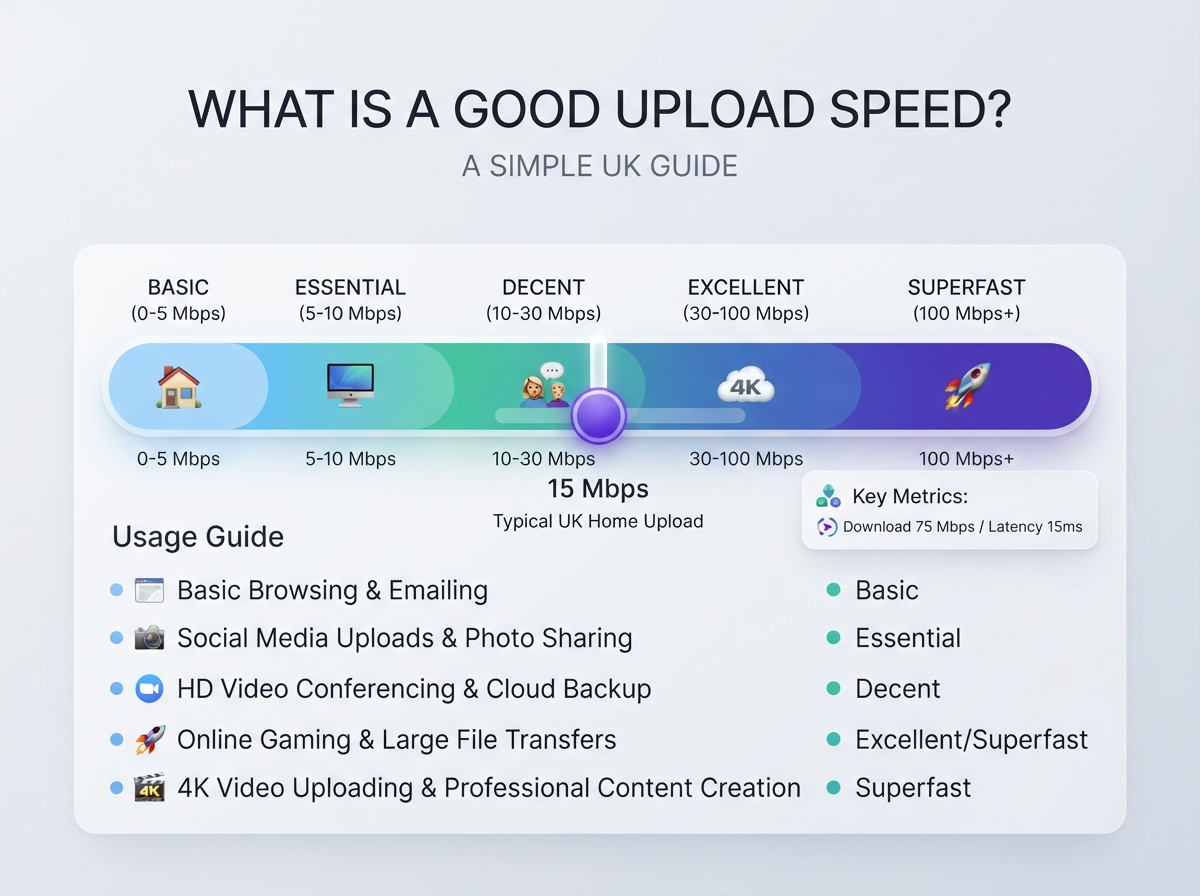
What Is a Good Upload Speed?
There is no single upload speed that is perfect for everyone.
A simple guide is:
| Upload speed | General use |
|---|---|
| 1 Mbps | Basic uploads and simple internet use |
| 5 Mbps | Light video calls and file uploads |
| 10 Mbps | Good for normal home use |
| 20 Mbps | Good for video calls and regular uploads |
| 50 Mbps | Very good for busy households |
| 100 Mbps | Excellent for heavy upload use |
| 200 Mbps+ | Very high upload capacity |
For many people, 10–20 Mbps can be enough for normal home use.
People who regularly upload large files, work with cloud services, create videos or stream live content may prefer 50 Mbps or more.
Is 1 Mbps Upload Speed Good?
1 Mbps is a relatively low upload speed.
It can support simple tasks such as:
- Sending small emails
- Uploading small photos
- Basic web activity
However, it may struggle with:
- Large file uploads
- High-quality video calls
- Cloud backups
- Live streaming
- Multiple users uploading at the same time
Ofcom’s UK broadband Universal Service Obligation uses 1 Mbps upload alongside 10 Mbps download as the minimum “decent” broadband connection benchmark. (ofcom.org.uk)
This is a minimum benchmark, not necessarily the ideal upload speed for a modern household.
Is 5 Mbps Upload Speed Good?
5 Mbps can be enough for light upload activity.
It may work for:
- Small file uploads
- Photos
- Emails
- Basic video calls
- Social media uploads
- Occasional cloud backups
However, if several people upload files or make video calls at the same time, 5 Mbps may feel limited.
Is 10 Mbps Upload Speed Good?
10 Mbps is a reasonable upload speed for many basic home users.
It can support:
- Video calls
- Photo uploads
- Small and medium file uploads
- Cloud services
- Social media
- Online meetings
- General work-from-home tasks
For one or two people with normal upload requirements, 10 Mbps can be enough.
Is 20 Mbps Upload Speed Good?
20 Mbps is a good upload speed for many households.
It provides more capacity for activities such as:
- HD video calls
- Cloud backups
- Uploading photos
- Uploading documents
- Sharing videos
- Working from home
- Multiple connected devices
It can also make large uploads noticeably quicker than a low-speed connection.
Is 50 Mbps Upload Speed Good?
Yes. 50 Mbps is a fast upload speed for most home users.
It can be useful for:
- Frequent large file uploads
- Video creators
- Cloud backups
- Multiple video calls
- Live streaming
- Remote work
- Sharing high-resolution photos and videos
For a household where several people upload data at the same time, 50 Mbps gives you much more capacity.
Is 100 Mbps Upload Speed Good?
100 Mbps upload is a very fast home upload speed.
It can be useful for people who regularly work with large files.
For example:
- Video editors
- Content creators
- Live streamers
- Remote workers
- Photographers
- Designers
- Developers
- Large cloud backups
A 100 Mbps upload connection can also be useful in a busy household with several people uploading data simultaneously.
Is 200 Mbps Upload Speed Good?
200 Mbps upload provides very high upload capacity.
For most normal households, it is more than enough.
It can be useful if you:
- Upload large video files
- Use cloud storage heavily
- Run large backups
- Stream live content
- Transfer large files frequently
- Have many people uploading at once
Whether you need this much upload speed depends on your actual internet usage.
What Upload Speed Do I Need for Video Calls?
Video calls use upload speed because your camera and microphone send information to the other participants.
Your required speed depends on:
- Video quality
- Number of people in the call
- Application
- Number of simultaneous calls
- Other internet activity
A simple guide is:
| Video call use | Suggested upload capacity |
|---|---|
| Basic video call | 1–3 Mbps |
| HD video call | 3–5 Mbps+ |
| Several video calls | 10 Mbps+ |
| Multiple people working from home | 20 Mbps+ |
A stable connection is also important.
You can have a high upload speed but still experience problems if you have packet loss, high latency or an unstable Wi-Fi connection.
What Upload Speed Do I Need for Working From Home?
Working from home can involve much more uploading than basic browsing.
You may upload:
- Work documents
- Presentations
- Images
- Video files
- Cloud backups
- Screen-sharing data
- Video meeting data
For basic office work, 5–10 Mbps upload can be enough.
For heavier work, 20–50 Mbps or more can provide extra capacity.
If multiple people work from home at the same time, a faster upload connection can be useful.
What Upload Speed Do I Need for Zoom or Video Meetings?
Video meeting applications use both download and upload bandwidth.
For a normal home user, 10 Mbps upload provides plenty of capacity for many video meeting situations.
However, the required speed depends on video quality, the meeting platform and what other devices are doing.
If several people in your home are in video meetings simultaneously, having more upload capacity can help.
What Upload Speed Do I Need for Live Streaming?
Live streaming can require significantly more upload capacity than ordinary browsing.
The required upload speed depends on:
- Video resolution
- Bitrate
- Streaming platform
- Frame rate
- Stream quality
- Other upload activity
A simple guide is:
| Live streaming quality | Useful upload capacity |
|---|---|
| Basic streaming | 5–10 Mbps |
| HD streaming | 10 Mbps+ |
| High-quality streaming | 20 Mbps+ |
| Multiple streams or heavy uploads | 50 Mbps+ |
A stable connection is especially important for live streaming.
A fast but unstable connection can still cause dropped frames or interruptions.
What Upload Speed Do I Need for YouTube?
If you upload videos to YouTube, upload speed affects how long it takes to send the video file to the platform.
For example, a large video can take a long time to upload on a slow connection.
A faster upload speed is useful if you regularly upload:
- HD videos
- 4K videos
- Long videos
- Multiple videos
- Large project files
If you only upload short videos occasionally, you may not need an extremely fast connection.
Does Upload Speed Affect Gaming?
Upload speed can affect online gaming, but it is not normally the only factor that matters.
For gaming, you should also consider:
- Ping
- Jitter
- Packet loss
- Connection stability
- Server location
- Wi-Fi quality
A very high upload speed does not automatically mean you will have low ping.
For most online games, a stable connection with good latency can be more important than having an extremely high upload number.
Does Upload Speed Affect Netflix?
For normal Netflix-style streaming, download speed is usually much more important than upload speed.
You are receiving video data from the streaming service, so your download connection is doing most of the work.
Upload speed becomes more important when you are:
- Live streaming
- Uploading videos
- Using video calls
- Backing up files
- Sharing large files
Why Is My Upload Speed So Slow?
There are several possible reasons.
Your broadband package
Some broadband packages have much lower upload speeds than download speeds.
Wi-Fi problems
Weak Wi-Fi can reduce your upload performance.
Router location
A router placed behind furniture or far from your device can cause problems.
Network congestion
Your broadband network may experience different performance at busy times.
Other devices
Another device may be uploading files, photos or backups.
Cloud backups
Services that automatically back up photos and files can use your upload bandwidth.
Device limitations
Older devices may not support the full performance of your connection.
How Can I Check My Upload Speed?
The easiest way to check your upload speed is to run a broadband speed test.
Use our Broadband Speed Test to measure your current connection.
The test can help you see:
- Download speed
- Upload speed
- Ping
- Overall connection performance
For a better result, pause large downloads and uploads before testing.
If possible, connect your computer directly to the router with an Ethernet cable.
How to Get an Accurate Upload Speed Test
Follow these steps:
- Stop cloud backups.
- Pause large uploads.
- Stop video streaming on other devices.
- Close unnecessary applications.
- Connect your computer to the router.
- Use Ethernet if possible.
- Run the broadband speed test.
- Record your upload result.
- Test again at another time.
- Compare the results with your broadband package.
Running several tests can give you a better idea of your normal upload performance.
What Upload Speed Should I Be Getting?
Your expected upload speed depends on your broadband package.
For example:
| Advertised upload speed | General use |
|---|---|
| 1 Mbps | Basic upload activity |
| 5 Mbps | Light home use |
| 10 Mbps | Normal home use |
| 20 Mbps | Good home upload capacity |
| 50 Mbps | Fast upload |
| 100 Mbps | Very fast upload |
| 200 Mbps+ | Extremely high upload capacity |
The actual speed can vary because of your connection, router, Wi-Fi, device and network conditions.
Why Is My Upload Speed Lower Than My Download Speed?
This is normal for many broadband packages.
Traditional broadband technologies often provide a much higher download speed than upload speed because most customers historically downloaded more data than they uploaded.
For example, you may have:
100 Mbps download + 20 Mbps upload
That does not mean something is wrong.
Some full-fibre services can provide much higher upload speeds, depending on the network and package.
Full Fibre and Upload Speed
Full-fibre broadband uses fibre-optic technology all the way to the property.
It can offer very high download speeds and, depending on the provider and package, much higher upload speeds than some older broadband technologies.
Ofcom reported that full-fibre broadband was available to 82% of UK residential premises in January 2026. (ofcom.org.uk)
However, the exact upload speed you can get depends on the provider, network and package available at your address.
What Is a Good Upload Speed for a Family?
A family’s upload needs depend on what everyone does online.
| Household | Suggested upload speed |
|---|---|
| 1 person, light use | 5 Mbps |
| 1–2 people | 10 Mbps+ |
| 2–4 people | 20–50 Mbps |
| Heavy work from home | 50 Mbps+ |
| Content creators | 50–100 Mbps+ |
| Very heavy upload use | 100 Mbps+ |
These are general guidelines.
A family that mainly browses and watches streaming services may need far less upload capacity than a family where several people work from home and regularly upload large files.
What Is a Good Upload Speed for Content Creators?
Content creators often need more upload speed than ordinary internet users.
If you create videos, you may regularly upload large files.
A faster upload speed can save time when uploading:
- YouTube videos
- TikTok videos
- Instagram content
- Podcasts
- Photography files
- Large project files
- Live streams
For regular video uploads, 50–100 Mbps upload can be very useful.
What Is a Good Upload Speed for Cloud Storage?
Cloud storage sends files from your device to an online server.
Examples include:
- Photos
- Videos
- Documents
- Computer backups
- Phone backups
- Work files
If you have a large amount of data to back up, upload speed becomes very important.
A 10 Mbps connection can upload files, but a 100 Mbps connection can transfer the same amount of data much faster under suitable conditions.
Upload Speed and File Upload Times
Theoretical upload time depends on file size and connection speed.
For example, a 1 GB file contains about 8,000 megabits.
In ideal conditions:
| Upload speed | Approximate time for 1 GB |
|---|---|
| 5 Mbps | About 27 minutes |
| 10 Mbps | About 13 minutes |
| 20 Mbps | About 7 minutes |
| 50 Mbps | About 2–3 minutes |
| 100 Mbps | About 1–2 minutes |
Real-world upload times can be longer because of network overhead, Wi-Fi limitations, server performance and other factors.
What Can Affect Upload Speed?
Your upload speed can be affected by:
- Broadband technology
- Internet package
- Wi-Fi signal
- Router
- Device
- Network congestion
- Other users
- Cloud backups
- Background applications
- Server performance
This is why testing with Ethernet can be useful.
Should I Upgrade My Upload Speed?
You may want to consider a faster upload package if:
- Large files take too long to upload.
- Video meetings have frequent problems.
- Cloud backups take many hours.
- You upload videos regularly.
- You live stream.
- Several people work from home.
- Several devices upload data at the same time.
Before upgrading, test your current connection.
You may find that your broadband package is fast enough and that the problem is caused by Wi-Fi or another local issue.
How to Choose a UK Broadband Provider
If you need better upload speed, compare the broadband options available at your address.
Look at:
- Download speed
- Upload speed
- Full-fibre availability
- Monthly price
- Contract length
- Installation costs
- Router
- Expected speeds
- Customer service
- Connection type
Our UK Broadband Providers guide can help you learn about different broadband providers and the types of broadband services available in the UK.
Always check availability at your own address because broadband options can vary between locations.
Is a Fast Upload Speed Important in the UK?
Upload speed is becoming more important as people use the internet for more two-way activities.
Modern households may:
- Work remotely
- Make video calls
- Upload videos
- Use cloud storage
- Back up phones
- Live stream
- Share large files
- Use smart home services
Full-fibre availability is also increasing across the UK. Ofcom’s January 2026 figures showed full-fibre coverage at 82% of UK residential premises. (ofcom.org.uk)
This means more households have access to broadband packages with higher upload capabilities, although availability and speeds vary by address.
Important Points to Remember
- Upload speed measures how quickly data leaves your device.
- Upload speed is measured in Mbps.
- Download speed and upload speed are different.
- 1 Mbps is enough only for very basic upload activity.
- 10 Mbps can be suitable for normal home use.
- 20–50 Mbps is useful for busy households.
- 50–100 Mbps is useful for heavy upload activity.
- Content creators may benefit from faster upload speeds.
- Video calls need both upload and download bandwidth.
- Live streaming depends heavily on upload quality.
- Gaming depends on ping, jitter and stability as well as speed.
- Wi-Fi can reduce your actual upload speed.
- Cloud backups can use a lot of upload bandwidth.
- Full-fibre packages may offer much faster upload speeds.
- Test your connection before upgrading your broadband package.
Frequently Asked Questions
What is a good upload speed in the UK?
For many homes, 10–20 Mbps can be a useful upload speed. People who work from home, upload large files or create online content may benefit from 50 Mbps or more.
Is 10 Mbps upload speed good?
Yes. 10 Mbps can be enough for many normal home activities, including video calls, photo uploads and everyday cloud use.
Is 20 Mbps upload speed good?
Yes. 20 Mbps provides a good amount of upload capacity for many households and can support video calls, file uploads and cloud services.
Is 50 Mbps upload speed good?
Yes. 50 Mbps is a fast upload speed for most home users and is useful for large file uploads, cloud backups, live streaming and multiple users.
Is 100 Mbps upload speed good?
Yes. 100 Mbps upload is a very fast home upload speed and can be useful for content creators, remote workers and households with heavy upload requirements.
Is 1 Mbps upload speed enough?
1 Mbps can support basic upload activity, but it may be too slow for large files, high-quality video calls, live streaming and multiple users.
Does upload speed affect gaming?
Upload speed can affect gaming, but ping, jitter, packet loss and connection stability are also very important.
Does upload speed affect Netflix?
Usually, download speed is more important for watching Netflix because your device is receiving the video. Upload speed matters more for activities such as video calls, live streaming and cloud backups.
What upload speed do I need for working from home?
For basic work, 5–10 Mbps can be enough. If several people work from home or you regularly upload large files, 20–50 Mbps or more may be useful.
How do I check my upload speed?
Use a broadband speed test to measure your current upload speed. For a more reliable test, pause other uploads and use an Ethernet connection when possible.
Conclusion
So, what is a good upload speed?
For basic home use, 5–10 Mbps can be enough. For many households, 10–20 Mbps provides a comfortable upload connection. If you work from home, upload large files, use cloud backups or create online content, 50 Mbps or more can be very useful.
For professional content creators, live streamers and very busy households, 100 Mbps or higher can provide excellent upload capacity.
Remember that upload speed is only one part of your internet connection. Wi-Fi quality, ping, jitter, packet loss, router performance and network stability can also affect your online experience.
Start by checking what you are actually getting with our Broadband Speed Test.
If your upload speed is lower than you need, you can then explore different options using our UK Broadband Providers guide.
The right broadband package is the one that matches the way your household actually uses the internet.
Check your internet connection with our fast and easy-to-use testing tools.
Popular Speed Test Tools